TL;DR
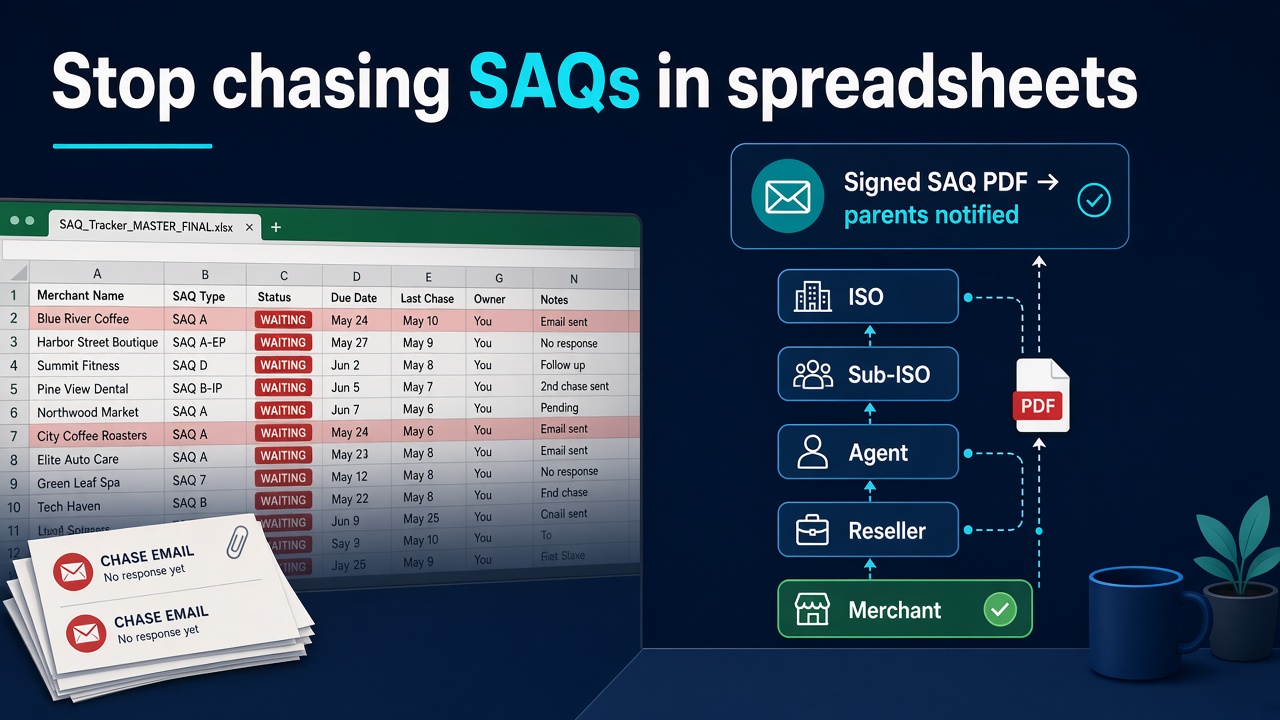
Chasing merchant SAQs in spreadsheets fails at portfolio scale. When you sit above dozens or hundreds of merchants — ISO → Sub-ISO → Agent → Reseller → Merchant — the ops problem is not “one more reminder email.” It’s visibility down the tree, scoped so peers can’t see each other’s book, and a real finish line: the merchant completes the questionnaire, and an acquirer-ready signed SAQ PDF emails up the parent chain to admins and owners. That’s live on pcidss-dashboard.com today — not a roadmap slide.
If you sell payments, PCI is not one merchant’s hobby.
It’s a portfolio problem.
I’ve talked to too many ISO / agent / MSP ops people who live the same week: open the Excel, find the red rows, copy-paste the chase email, wait, chase again, then ask the merchant to please forward the signed PDF they swear they finished. Somewhere in that loop someone loses the attachment, files last year’s form, or picks the wrong SAQ type and the acquirer bounces it anyway.
The spreadsheet is not the villain. Scale is. One merchant SAQ is a task. Two hundred is an operations system you never intended to build.
The chase nobody budgets for
Here’s the pattern I keep seeing on the channel side:
- Acquirer / program pressure lands on the ISO — “get your merchants current.”
- Ops opens the tracker — merchant name, SAQ type (maybe), last emailed, “waiting on signature,” a column named
STATUSthat means three different things depending who typed it. - Merchants get generic reminders — often with a blank PDF or a link to a 40-page form they will not finish on a Tuesday afternoon.
- Someone finishes something — Word doc, screenshot, wrong questionnaire, right questionnaire unsigned.
- Ops re-files by hand — download from email, rename, drop in a folder, update Excel, hope the parent ISO’s auditor can find it next month.
None of that produces the artefact the bank actually files. I wrote the merchant-side version of that truth in What Your Acquirer Actually Wants: signed, dated SAQ/AOC package — not a dashboard login and not a green cell in a shared sheet.
At portfolio scale you get a second failure mode: you can’t see the tree. Peer ISOs must not see each other’s merchants. Sub-agents need their book, not the whole channel. Auditors need read-only. Merchants need a short path, not your internal ops UI. Spreadsheet ACLs don’t do that. Shared Drive “permissions theatre” doesn’t either.
What “done” looks like (for the channel, not the slide deck)
Forget “we’ll get everyone compliant this quarter.” That’s not a sentence I use, and the product does not make anyone compliant by magic. Merchants still answer honestly. Level 1 usually means a ROC path rather than a self-signed SAQ cosplay, but the rule is set per card brand, so check with your acquirer.
What ops can actually call done:
- Merchant opens a minimal UI (Dashboard + Help Center — not your GRC cockpit)
- Walks the right questionnaire for how they take cards (Which SAQ Am I? helps them think; the acquirer’s named SAQ still wins — map of types: PCI DSS v4.0.1 SAQ Types Explained)
- Signs the Attestation
- Downloads / generates the acquirer-ready signed SAQ PDF
- That PDF auto-escalates up the parent chain — emailed to admins and owners above them in the tree
On the ISO / MSP side of the same moment:
- Aggregate dashboard: merchant count, SAQ completion stats, compliance rate, hierarchy breakdown, per-merchant list
- Scoped visibility: own org + descendants only; peer ISOs cannot see each other’s merchants
- Roles that match how channels actually staff: Owner, Administrator, Manager, Auditor (read-only), Contributor, Viewer
- Optional “Login as” a descendant when support needs to unblock someone — with an audit log for start/end, because “just share the password” is how you invent a worse spreadsheet
That’s the finish line I care about for portfolio operators: merchant finishes → signed artefact climbs the tree → you see completion rate without email archaeology.
Hierarchy is not a nice-to-have. It’s the product.
Payments channels are trees. Pretending they’re flat lists is how Excel gets heroic.
On PCI DSS Dashboard the hierarchy is live — MPTT tree, unlimited depth, built for large books:
ISO → Sub-ISO → Agent → Reseller → Merchant
(You can stop earlier. You can go deeper. The point is the model matches how you already sell.)
What that unlocks in practice:
| Need | What the tree gives you |
|---|---|
| Portfolio oversight | Aggregate completion / rate / per-merchant list for your subtree |
| Competitive walls | Scoped lists, exports, detail — peers stay blind to each other |
| Merchant UX | Short path: finish SAQ, get the PDF — not “learn our enterprise UI” |
| Support without chaos | Impersonation with audit trail; UUID invites with role + expiry |
| Comms that don’t spam the wrong book | Announcements down the tree with read tracking |
I built this because channel PCI is two different jobs wearing one label. The buyer is often the ISO / MSP. The person clicking is often the merchant. A feature that helps the merchant finish faster is a feature that helps the channel sell — and stop drowning in follow-ups.
(If you’re still living the single-entity spreadsheet version of this pain — requirements, evidence, pre-audit archaeology — that’s the origin story in Escaping Spreadsheet Hell. This post is the portfolio sequel.)
Tear-down: “We’ll just remind them monthly”
I hear this plan a lot. It sounds responsible. It fails for predictable reasons.
Reminder volume ≠ completion. Merchants ignore the third identical email. Ops burns the week on the same 40 red rows.
Reminders don’t fix the wrong questionnaire. You can chase someone into signing the wrong questionnaire. Signed ≠ accepted. Wrong type still gets bounced — and now you’ve trained the merchant that PCI emails are spam.
Reminders don’t file the artefact up-chain. Even when a merchant finishes, the PDF sits in their inbox. Parent ISO still chases. Sub-agent still chases. Someone still renames SAQ_final_FINAL2.pdf in a shared folder.
Reminders don’t enforce scope. A shared Google Sheet with “please only edit your tab” is not multi-tenant security. Peer visibility leaks are a channel risk, not a formatting preference.
Monthly cadence fights annual reality poorly. PCI validation is cyclical. Merchants board mid-year. Terminals change. Checkout scripts change. A calendar ping without state (which SAQ, which cycle, signed PDF yes/no, who above needs the copy) is theatre with a recurring invite.
The replacement for “remind harder” is boring and specific: state in one place, artefact on finish, escalate automatically, visibility scoped to the tree.
Vendor paperwork still matters on the merchant side — Requirement 12.8 doesn’t disappear because you’re an ISO watching completion rates. Merchants who think “processor is compliant → I’m done” are the ones you’ll re-chase next cycle; send them Requirement 12.8 / TPSP management before they invent a vendor file at midnight.
Soft path for MSP / ISO partners
If you run a merchant portfolio and PCI follow-ups are eating the week, I’m not going to pretend a blog post replaces a walkthrough of your tree.
What exists today on pcidss-dashboard.com:
- Full channel hierarchy + scoped visibility + aggregate ISO dashboard (live)
- Merchant SAQ wizards → acquirer-ready signed SAQ PDF, with auto-escalation up the parent chain
- Broader / multi-client / Level 1 ROC tooling under Enterprise when the book isn’t “SAQ A merchants only”
- Per-merchant artefact pricing stays simple when someone only needs the PDF (SAQ A / B-IP reports €99; SAQ A-EP €699) — portfolio conversations are a different motion
That is still artefact-first. The thing the acquirer files is the signed SAQ/AOC package. The hierarchy is how you stop chasing it merchant-by-merchant in spreadsheets. Using the platform does not make a merchant (or an ISO) “compliant” — it organises the work and produces the document your program expects. Level 1 usually means a ROC, but the rule is set per card brand, so check with your acquirer.
For an MSP / ISO partner chat — how your tree maps, who sees what, what “done” emails look like in practice — write sales@pcidss-dashboard.com or use Contact. Happier to compare notes on a real portfolio than watch another ops lead invent Column G.