TL;DR
PCI DSS Dashboard now connects to Claude. You can ask the questions your assessor will ask, such as "did we run our quarterly scans every quarter?" or "what's still not in place?", and get back dates, owners, gaps and links into your dashboard. It is read-only, it sees only what your account can see, and it never receives the contents of your evidence files. It helps you prepare. It does not replace the assessor's review, and its answers are not evidence. The evidence is what's in the dashboard.
The assessor sits down and asks: "Show me you ran your external vulnerability scans every quarter for the past twelve months."
That is PCI DSS v4.0.1 Requirement 11.3.2, and the question is fair. Answering it is the slow part. Someone opens the scan task, scrolls the completion history, checks which quarter has a report attached, notices one quarter where the scan ran late, and exports the files. Then the assessor asks the same thing about log reviews (10.4.1), then about user access reviews (7.2.4), then about security awareness training (12.6.1).
None of it is hard. All of it takes an afternoon you don't have in assessment week.
What we built
PCI DSS Dashboard now works with AI assistants through the Model Context Protocol, the open standard AI assistants use to connect to other software. In practice: you connect Claude to your account once, and then you can ask it about your compliance programme in plain language.
Three questions, and what comes back
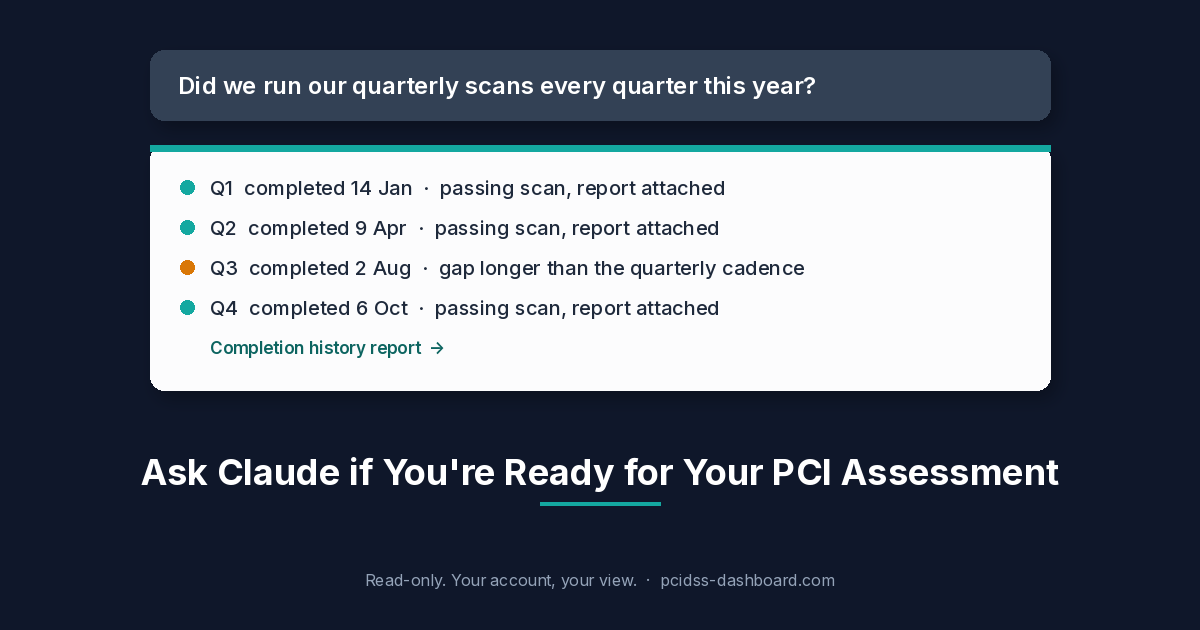
"Did we run our quarterly vulnerability scans every quarter this year?"
Claude looks at the recurring task and answers the way the assessor wants to hear it: each completion with its date and outcome, who completed it, and any gap longer than the quarterly cadence. It also links to the completion history report, which you can download as PDF or Excel and hand over.
The same works for any recurring activity you track: log reviews, access reviews, training. "Are there any gaps in our log reviews this year?" is a one-line question now.
"How ready are we for our assessment?"
You get readiness by requirement, 1 to 12: what is in place, not in place, not applicable, and not yet assessed. It also calls out the uncomfortable category, items marked in place with no evidence attached, plus overdue tasks and open findings such as vulnerabilities, pen-test findings, risks and incidents.
"Which requirements are marked in place but have no evidence?"
This is the question to ask a month before the assessor arrives, not the morning of. An "In Place" with nothing behind it is the answer that turns a short walkthrough into a long one. Claude lists them so you can fix them while there is still time.
Every answer links back into the dashboard: the task, the completion, the evidence record, the report. Those links open with your own login. The dashboard stays the source of truth.
What it can't do, and why that's deliberate
We kept this narrow on purpose.
- Read-only. Claude can't update records, upload evidence or mark tasks done. It reads.
- Your account, your view. Claude signs in as you and sees only what your account can see. Nothing more.
- No file contents. Claude never receives what is inside your evidence files. It sees names, dates and who uploaded them.
- One-click disconnect. Claude connections show up under Connected Apps on your AI Assistant Access page, and you can disconnect from there at any time. Connections use short-lived sign-in tokens.
Compliance data is sensitive. An assistant that can answer questions about it is useful. An assistant that could change it, or read your firewall configs, is a different conversation, and not one we needed to have to make this useful.
For partners
If you run a portfolio of merchants as an ISO, sub-ISO, agent or reseller, the questions change shape but the idea is the same. "Which merchants started their SAQ over 30 days ago and still haven't finished?" "Whose validation expires in the next 60 days?" You get the list without opening each merchant. Owners and admins of partner accounts have access.
How to connect
- In Claude, add a custom connector with the URL
https://pcidss-dashboard.com/mcp. - Sign in with your normal PCI DSS Dashboard login (Google sign-in works too).
- Approve the connection.
No keys to copy. The help article, Connecting PCIDSS Dashboard to Claude Desktop, walks through it (login required).
It works with Claude on desktop, web and mobile. Claude's own help centre lists custom connectors on Free (one connector), Pro, Max, Team and Enterprise. On Team and Enterprise, an owner adds it once for everyone. Developers can use an access key instead with Claude Code, Cursor or VS Code. Keys expire after 30 to 365 days, are shown once, can be revoked at any time, and each user can have up to five active keys.
Who gets it
- Merchants and service providers on SAQ D assessments
- ROC customers with an active Enterprise plan
- Owners and admins of ISO, sub-ISO, agent and reseller accounts
If that's you, open AI Assistant Access from your user menu and connect Claude in a minute. If you're preparing for an assessment and want to see how this fits, get in touch. Partners: ask your account manager.