Why We Built AI Into a Compliance Platform
PCI DSS compliance is documentation-heavy. Hundreds of requirements, each needing evidence that your systems meet the standard. Screenshots of firewall configs, network diagrams, vulnerability scan results — all mapped to specific requirements, all reviewed by an assessor.
The problem isn’t understanding what’s needed. It’s the sheer volume of manual work: inventorying every system component by hand, cross-referencing evidence against requirement text, and repeating the process every assessment cycle.
We asked ourselves: what if the platform could do some of that work for you?
Two AI Features, Two Real Problems
We didn’t bolt on AI for the sake of a buzzword. We identified two specific workflows where compliance teams spend disproportionate time, and built targeted solutions for each.
1. Import System Components from Network Diagrams
Every PCI DSS assessment starts with scoping — identifying every system that stores, processes, or transmits cardholder data, plus everything connected to those systems. This means building a complete inventory of servers, databases, firewalls, network devices, and more.
Most teams do this manually: open the network diagram, squint at labels, type each component into a spreadsheet or tool. For a complex environment, this can take days.
Our approach: Upload a network diagram image to the System Components page. The AI vision model analyzes the diagram and extracts every component it can identify — names, IP addresses, types, locations, and whether they’re likely in the Cardholder Data Environment (CDE). The results appear in an editable review table where you can correct, remove, or confirm each component before saving.
Key design decisions:
- Review before save. AI extracts components into a staging area. Nothing hits your inventory until you explicitly confirm. You can edit every field, toggle components on or off, and remove false positives.
- Editable fields. Component name, type, function, IP address, MAC address, operating system, location, PCI scope, and CDE status — all editable in the review table before import.
- Linked to evidence. The uploaded diagram is automatically stored in the Evidence Repository, so your assessor can trace exactly where each component came from.
2. Check Evidence Compliance Against Requirements
The second workflow targets evidence review. When you upload a screenshot or document as evidence for a PCI DSS requirement, someone needs to evaluate whether that evidence actually satisfies the requirement. Does this firewall config screenshot demonstrate compliance with Requirement 1.2.1? Does this scan report satisfy 6.3.3?
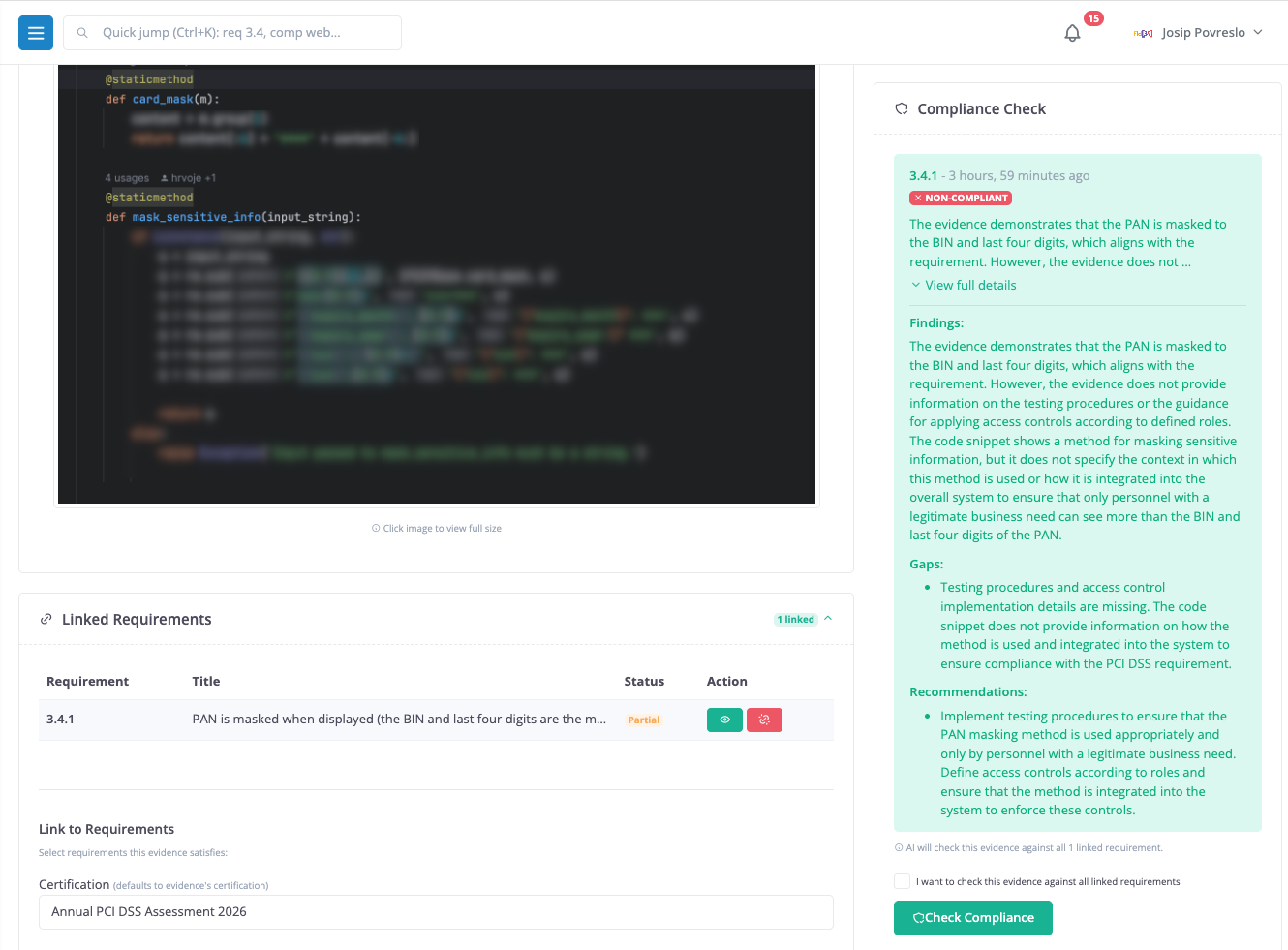
Our approach: When you upload evidence linked to a requirement (or link it afterward), you can trigger an AI compliance check. The AI receives the evidence image along with the full requirement text — including the requirement number, title, description, testing procedures, and guidance notes — and returns a structured assessment:
- Compliant or Non-Compliant — a clear verdict
- Findings — detailed assessment of what the evidence shows and how it relates to the requirement
- Gaps — specific elements missing from the evidence
- Recommendations — actionable steps to achieve or improve compliance
When evidence is linked to multiple requirements, the check runs against all of them — one assessment per requirement, each with its own findings. Results appear on the evidence detail page with expandable sections for the full analysis.
This doesn’t replace your QSA or your own judgment. But it gives you an immediate first pass — catch obvious gaps before your assessor does, and focus your team’s time on the requirements that actually need attention.
How It Works Under the Hood
The AI layer uses a pluggable provider architecture. We support multiple providers — Anthropic Claude, OpenAI, Google Gemini, xAI Grok — but the vision features are powered by local model, AI model running locally on your own infrastructure.
Why Local Model?
Compliance teams handle sensitive data. Network diagrams show your entire infrastructure topology. Evidence screenshots may contain system configurations, IP addresses, or security control details. Sending this to a cloud AI API raises legitimate data sovereignty concerns.
With the local model, the AI model runs on a server you control. Your images never leave your network. The PCIDSS Dashboard connects to your local model instance over your internal network (or via VPN, etc.) and sends the analysis request directly. No cloud provider sees your data.
We use the vision model which provides strong image understanding in a package that runs on a single GPU. In case you are looking into hosting it yourself.
The platform handles image preprocessing (resizing to fit the model’s requirements), retry logic with exponential backoff, and timeout handling for long-running analyses.
What This Means for Your Workflow
These features slot into your existing compliance workflow without requiring changes:
- During scoping: Upload network diagrams to quickly build your component inventory. Review and refine the AI’s output, then confirm. What used to take days now takes minutes plus review time.
- During evidence collection: Upload evidence as usual. Before sending it to your assessor, run a compliance check to catch gaps early. Fix issues before they become audit findings.
- During reassessment: When your environment changes, upload updated diagrams and re-import components. Run fresh compliance checks against updated evidence. The platform keeps history of all previous checks.
Privacy and Control
We designed the AI features with compliance teams’ concerns in mind:
- Self-hosted AI. runs on your infrastructure. No data leaves your network for AI processing.
- Human in the loop. AI extracts and suggests — humans review and confirm. No automatic changes to your compliance data.
- Full audit trail. Every compliance check is logged with timestamps, the requesting user, the AI’s raw response, and the parsed results.
- Provider flexibility. If you prefer a different AI provider, the pluggable architecture supports switching without code changes.
Getting Started
If you’re evaluating PCIDSS Dashboard, login and explore the demo and see how AI-assisted compliance can save your team hours of manual work every assessment cycle.